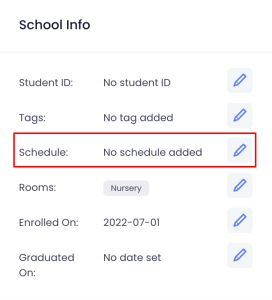
After creating an OT Policy, you need to assign it to each student’s profile so that the system can calculate OT charges correctly
Go to the Student Profile
Scroll to the School Info section
Click the pencil icon next to the Schedule
In the edit window, select the appropriate OT Policy for the student
Click Submit to apply
Important Notes
Once a student has clocked in, you cannot make changes to their assigned OT Policy until they clock out
Always assign or update policies before the student checks in for the day.
See our solution in action!
Schedule a demo below and we’ll be in touch to show you how we can help to manage your childcare business and increase your parent engagement with Twinklinc.