
- [Admin]
- [Student Admin with Billing Permission]
Simplify monthly billing with recurring invoices — set it up once and invoices are sent automatically every month.
Choose when invoices are issued, set send and due dates, and reduce manual billing work
To Know Before You Get Started:
- Set up billing items first
This helps you manage and reuse charges easily when creating invoices - Set the default billing contact for each student
The system uses this to know which parent to send the invoice to
Set Up Recurring Invoice Settings #
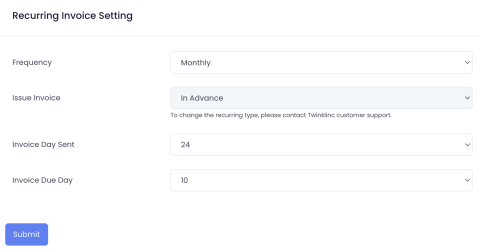
- Go to Billing > Recurring Invoices
- Click the Recurring Invoice Setting button
- Configure recurring details:
- Frequency – Monthly (The system will automatically generate and send the invoice every month)
- Issue Invoice – Choose when the invoice should be issued:
- In Advance: The invoice is issued before the billing month. Example: February invoice is sent in January
- Same Month: The invoice is issued within the same billing month. Example: February invoice is sent in February
- Send On Day – Select the day of the month when the invoice will be sent to parents
- Due Day – Select the day of the month by which payment must be made
- Review the details and click Save to activate the recurring invoice
Create a New Recurring Invoice #
- Go to Billing > Recurring Invoices
- Click the New Recurring Invoice button
- Step 1: Filter students by Room or Tag. Select one or multiple students to include in the billing plan
- Enter the invoice item(s) to be charged. Set the Plan Start Date and Plan End Date
- Plan Start Month: Determines when the recurring billing begins. The system will start generating invoices for this month
- Plan End Month: Determines when the recurring billing stops. No invoices will be generated after this month
- Review the selected students and billing details. Confirm the recurring billing plan to activate it